Tigmi.
Trusted by Designers, Agents and Homeowners

Interior Design Styles & Trends

Trends, palettes, and style guides for modern interiors.

1-2 mintypical render time
100%architecture preserved
2,847projects completed

First render free • Uploads stay private. Delete any time.

  • Instant results
  • Room Lock™
  • Light Lock™
  • Style Engine™
Client photoAI Decor Studio
Before interior
BeforeOriginal room
AfterAI redesigned

How it works

Three simple steps to transform your space

1

Upload photo

Drag & drop your room photo or click to browse

2

Pick style

Choose from 16 designer-curated styles

3

Get results

Download photorealistic redesign in minutes

See the transformation

Real rooms, real results. Our AI preserves your architecture while creating stunning makeovers.
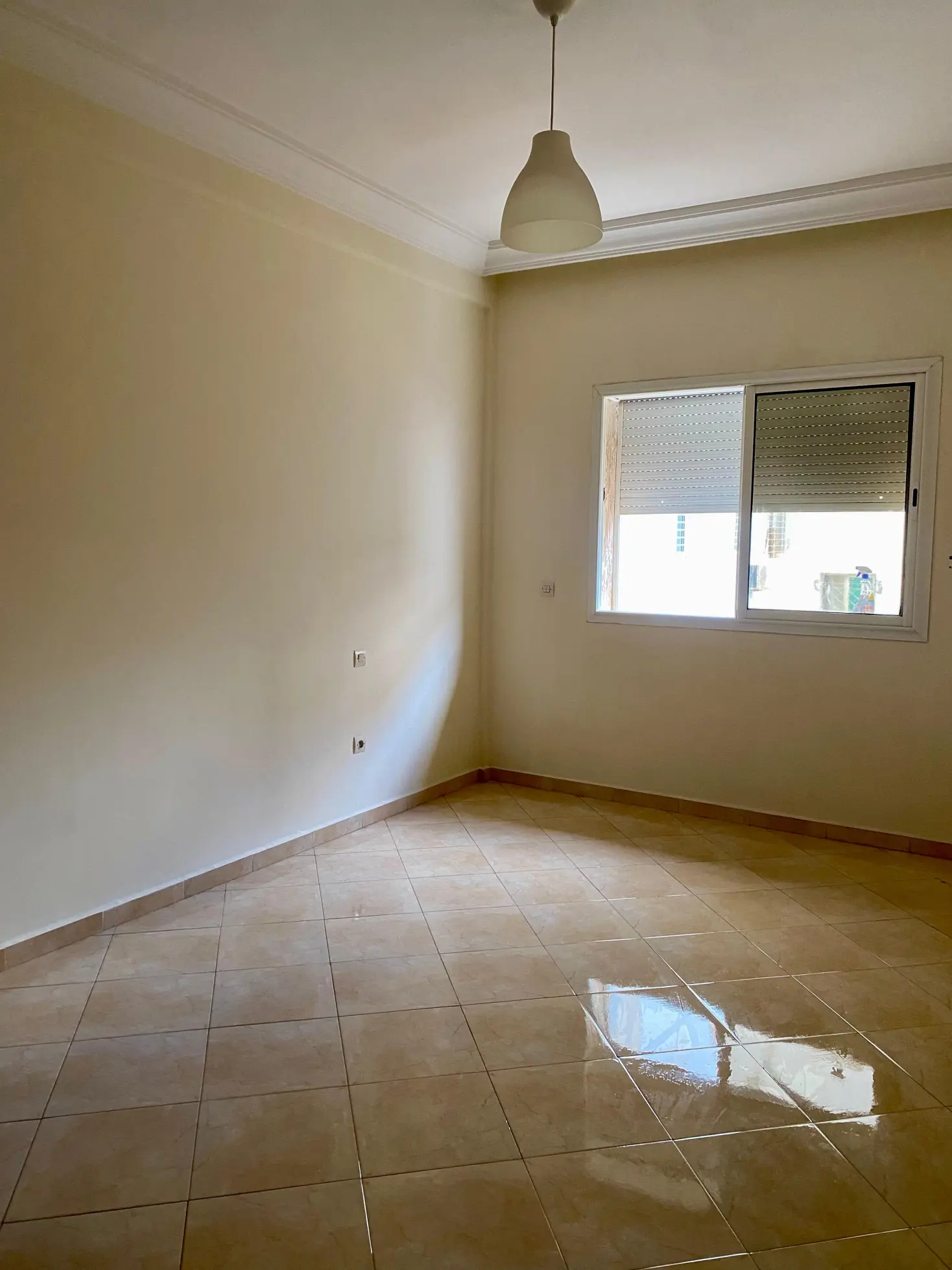
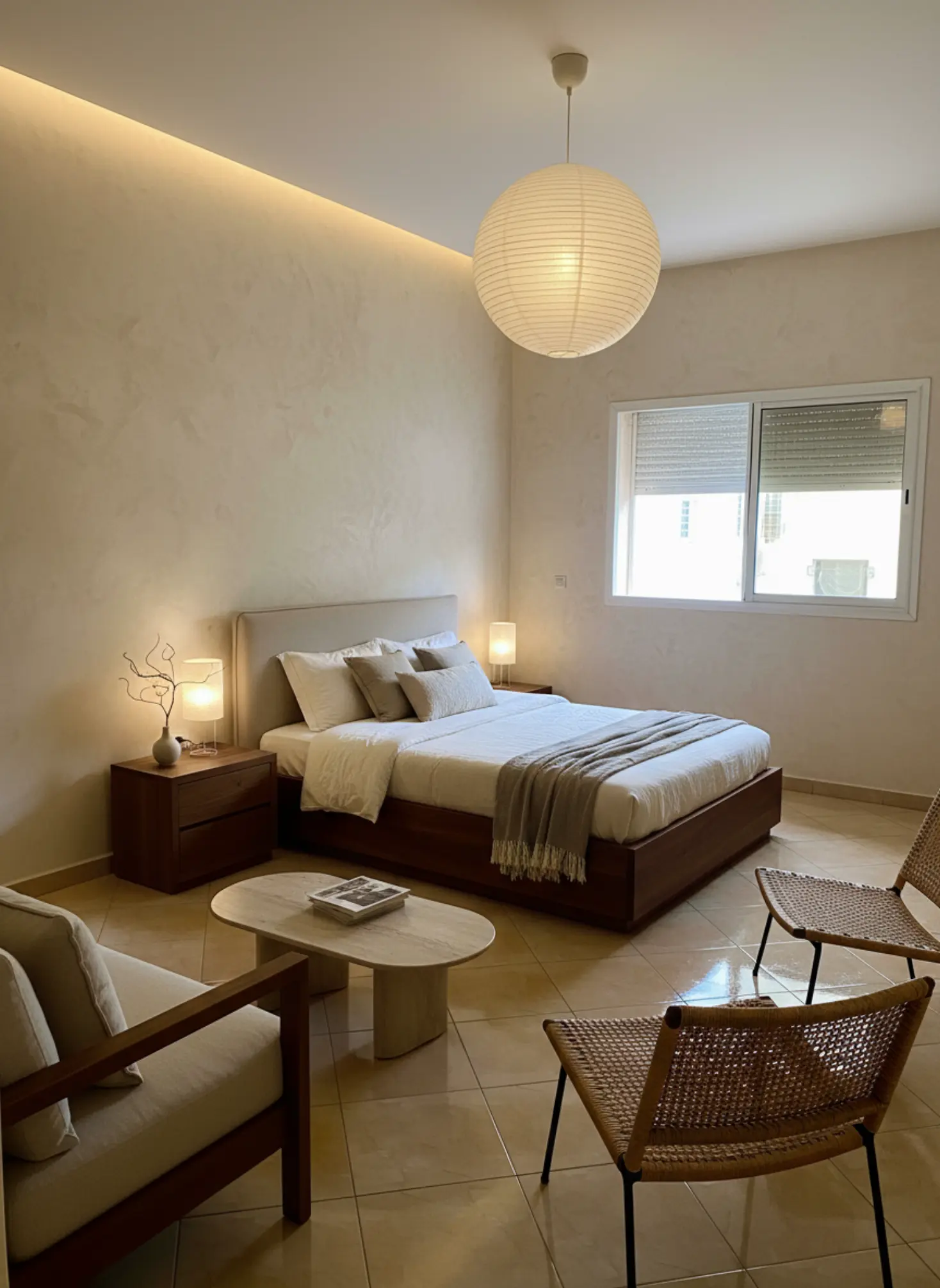
Before makeover
After makeover
Before makeover
After makeover

Bedroom Redesign: Transformed a cluttered bedroom into a modern, minimalist haven.

What our AI preserves

  • Room proportions

    Ceiling height, wall dimensions, and spatial relationships

  • Natural lighting

    Window placement, light direction, and shadows

  • Architectural details

    Moldings, built-ins, and structural elements

  • Camera angle

    Maintains your original perspective and framing

Ready to transform your space?

Upload your room photo and see the magic happen in minutes.

Try it free now

Interior Design Styles & Trends

Interior Design Styles & Trends shape how a room feels, functions, and ages, which is why they matter far beyond a passing Pinterest mood. The right style direction can make a compact apartment feel calm and intentional, or turn a dated living room into a space that feels collected rather than forced. Right now, people are balancing timeless foundations with faster-moving trend cycles, so knowing what belongs in your home matters more than chasing whatever is popular this month. This page is your central resource for understanding the major styles, reading the trends behind them, and making choices that still feel right a few years from now.

Trends, palettes, and style guides for modern interiors.

Understanding Interior Design Styles & Trends

Interior Design Styles & Trends cover the visual language of a space: layout, proportion, color, materials, furnishings, lighting, and the mood those elements create together. A style is not just a look; it is a system of decisions that helps a room feel coherent, whether you lean toward Japandi calm, Nordic Light, Coastal Breeze, or Classic Elegance. Trends sit inside that system as the details that shift over time, like curved silhouettes, limewash walls, smoked oak, or bouclé upholstery. The key is understanding hierarchy: architecture first, then fixed finishes, then large furniture, then accents and styling. If you get the foundation right, you can change the mood later with a rug, a lamp, or a paint color without starting over. That is why experienced designers pay attention to scale, sightlines, natural light, and texture before they talk about decor. Good style work is never about copying a photo exactly; it is about translating a visual idea into your actual room.

The current direction in Interior Design Styles & Trends is moving away from overly polished rooms and toward spaces that feel layered, tactile, and more personal. You can see that shift in the popularity of warm neutrals, white oak, natural stone, tumbled finishes, handmade ceramics, and fabrics that invite touch, such as linen, wool, and bouclé. There is also a stronger appetite for contrast: softer forms paired with architectural lines, matte finishes next to honed marble, or quiet palettes punctuated by one saturated accent like oxblood, olive, or deep indigo. Market-wise, people want longevity, which is pushing interest in adaptable styles such as Modern Haven and Japandi Calm rather than trend-chasing rooms that date quickly. Sustainability is influencing choices too, with more clients asking for vintage pieces, recycled materials, and durable upholstery that can survive real life. Even maximalist spaces are becoming more edited, with fewer objects and stronger focal points instead of visual noise. The result is a broader definition of good taste: less about matching and more about balance, restraint, and a sense of lived-in ease.

Technology is changing how people explore Interior Design Styles & Trends because it removes a lot of the guesswork before you buy anything. Instead of imagining how a style might work, you can test it directly on your own room photo and compare options side by side. Tigmi is especially useful here because it preserves your real architecture, so your windows, wall proportions, light direction, and built-in features remain intact while you explore different styles. That matters more than it sounds like, because a style that looks perfect in a catalog can fail in a room with low ceilings, a narrow layout, or cold afternoon light. With style presets, you can quickly compare directions like Loft Industrial versus Nordic Light, then use before/after views to judge whether the change still feels like your home. For homeowners, that means fewer expensive mistakes; for designers, it means faster concept development; for real estate agents, it means showing a property’s potential without furniture rentals. Technology is not replacing taste here. It is giving you a faster, clearer way to trust it.

How to use this playbook

This playbook turns interior design styles & trends into decisions you can test in Tigmi. Use it to align mood, palette, and layout before you buy or renovate, then share it as a short brief with anyone involved.

Start broad with atmosphere and lighting, then narrow into materials, furniture scale, and finishing touches. Save your best Tigmi renders as checkpoints so the direction stays consistent from idea to execution.

Playbook snapshot

Use these signals to keep interior design styles & trends decisions aligned across layout, palette, and budget.

  • Goal: write the room story in one clear sentence.
  • Palette: pick one base, one accent, one contrast.
  • Materials: commit to a hero surface and one tactile fabric.
  • Lighting: plan daytime + evening layers before shopping.
  • Layout: keep one clean circulation path at all times.
  • Styling: choose one hero moment and repeat its cues.

What you'll learn

  • Identify the main interior design styles and the visual cues that distinguish them, from materials and silhouettes to color temperature and styling choices.
  • Evaluate which trends are worth adopting in your home and which ones are likely to date quickly.
  • Match a design style to your room’s architecture, light, and function so the result feels natural rather than forced.
  • Build a layered room concept using foundational finishes, statement furniture, and smaller trend-led accents.
  • Use AI-powered room previews to compare style directions before committing to paint, furniture, or renovation decisions.

Playbook checklist

Use this checklist to keep interior design styles & trends decisions aligned from moodboard to final render.

  • Define the room goal and the feeling you want visitors to have.
  • Pick a primary palette plus two supporting accents.
  • Lock one hero material and one hero texture for the space.
  • Confirm lighting layers: ambient, task, and accent.
  • Set scale rules for seating, storage, and walkways.
  • Render three variations in Tigmi to compare interior design styles & trends directions.
  • Translate the best render into a shopping or renovation list.
  • Collect feedback and update the prompt once, not ten times.
  • Keep a running list of measurements so the layout stays realistic.
  • Decide one hero moment to anchor the styling story.

Prompt ideas for Tigmi

Start with these prompt angles, then refine them with your materials and lighting notes.

  • interior design styles & trends, warm neutral base, layered textures, soft daylight, editorial styling.
  • interior design styles & trends, high-contrast palette, sculptural lighting, minimal clutter, gallery vibe.
  • interior design styles & trends, natural materials, calm layout, cozy seating, golden-hour glow.
  • interior design styles & trends, modern classic mix, brass accents, tailored textiles, hotel feel.
  • interior design styles & trends, airy layout, open sightlines, matte finishes, curated art.
  • interior design styles & trends, tonal palette, plush textiles, soft curves, serene mood.
  • interior design styles & trends, bold focal wall, layered lighting, clean sightlines, premium feel.

Top topics to explore

Market playbooks

Common pitfalls to avoid

Avoid these missteps so interior design styles & trends outcomes stay polished and intentional.

  • Choosing a style because it looks good in isolation, then ignoring the room’s proportions, light, or existing architecture, which often makes the result feel disconnected.
  • Mixing too many trend-led details at once, which creates visual clutter and shortens the lifespan of the design because nothing has room to breathe.
  • Copying a style without adapting materials to your climate or lifestyle, such as using delicate finishes in a high-traffic family room or dark, heavy pieces in a dim space.
  • Starting with accessories instead of foundations, which usually leads to a room that feels decorated but not truly designed.

Expert Insight

The strongest interiors usually follow a 70/20/10 principle: about 70% of the room should be timeless and quiet, 20% should introduce character through furniture or material contrast, and 10% can carry the more expressive trend detail. That ratio keeps a room feeling current without collapsing under novelty. If a trend only works when everything matches it, it is probably too fragile to build a whole room around.

How to use Tigmi

  1. 1

    Upload a photo of your room and use Tigmi’s style presets to test different Interior Design Styles & Trends, such as Modern Haven, Japandi Calm, or Moroccan Vibrance.

  2. 2

    Use room lock to keep your existing architecture, windows, and natural light in place so you can judge the style against your real space, not an idealized version of it.

  3. 3

    Compare before/after views to see how materials, color palettes, and furniture shapes change the mood, scale, and flow of the room.

  4. 4

    Save the strongest direction as a reference board, then refine your next decisions around paint, upholstery, lighting, and decor with far more confidence.

Playbook FAQs

What are the most important Interior Design Styles & Trends to understand first?

The most important styles to understand first are the ones that define today’s most adaptable rooms: Japandi, Nordic, Modern Haven, Coastal, Industrial, Boho, and Classic-inspired interiors. These styles cover the core decisions that shape a room’s feel, including palette, materiality, furniture profile, and the balance between warmth and restraint. Once you understand those cues, it becomes much easier to spot trends that are worth adopting versus ones that are only fashionable for a season.

How do I choose an interior design style that fits my home?

Choose the style that works with your home’s architecture, light, and daily use first. A room with strong natural light and clean lines may suit Nordic Light or Japandi Calm, while a period property with arches or textured plaster may hold Classic Elegance or Moroccan Vibrance more naturally. The best choice feels like it belongs to the space, not like it was dropped in from a mood board.

Which Interior Design Styles & Trends are likely to last?

The styles most likely to last are the ones built on timeless proportions, natural materials, and flexible palettes. Think white oak, linen, honed stone, warm neutrals, and furniture with clean but not overly rigid lines. Trends built around a single novelty color or a highly specific gimmick usually fade faster than rooms grounded in texture, comfort, and good scale.

How can I use trends without making my home feel dated quickly?

Use trends in the layers that are easiest to change, such as cushions, artwork, lamps, rugs, and smaller decor pieces. Keep your larger investments, like sofas, flooring, cabinetry, and dining tables, more restrained so they can outlast shifting tastes. That approach gives you room to experiment while protecting the parts of your home that are expensive to replace.

How does Tigmi help with Interior Design Styles & Trends?

Tigmi helps you test style directions on your actual room before you commit to anything. You can compare presets, preserve your real architecture with room lock, and review before/after views to see which style truly works in your space. That makes it easier to avoid costly mistakes and choose a direction with confidence.

Ready to create?

Try Tigmi to test Interior Design Styles & Trends on your actual room so you can choose a direction that feels right before you spend a single dollar.

Start with Tigmi →

Explore more with Tigmi

Ready to transform your space?

Upload your room photo and see the magic happen in minutes.

Try it free now

Upload a room photo and get a designer level makeover in minutes

Try your room free