What interior AI tools do, how they redesign a room from one photo, what they can't do yet, and how to get results you can actually use.
- ✓ Interior AI tools redesign a room from one photo: new style, colors and furniture, same walls and windows.
- ✓ They are great for deciding what you like; they don't measure your room or give you real products.
- ✓ Best results: a daylight photo from a corner, one named style, concrete materials, and say what to keep.
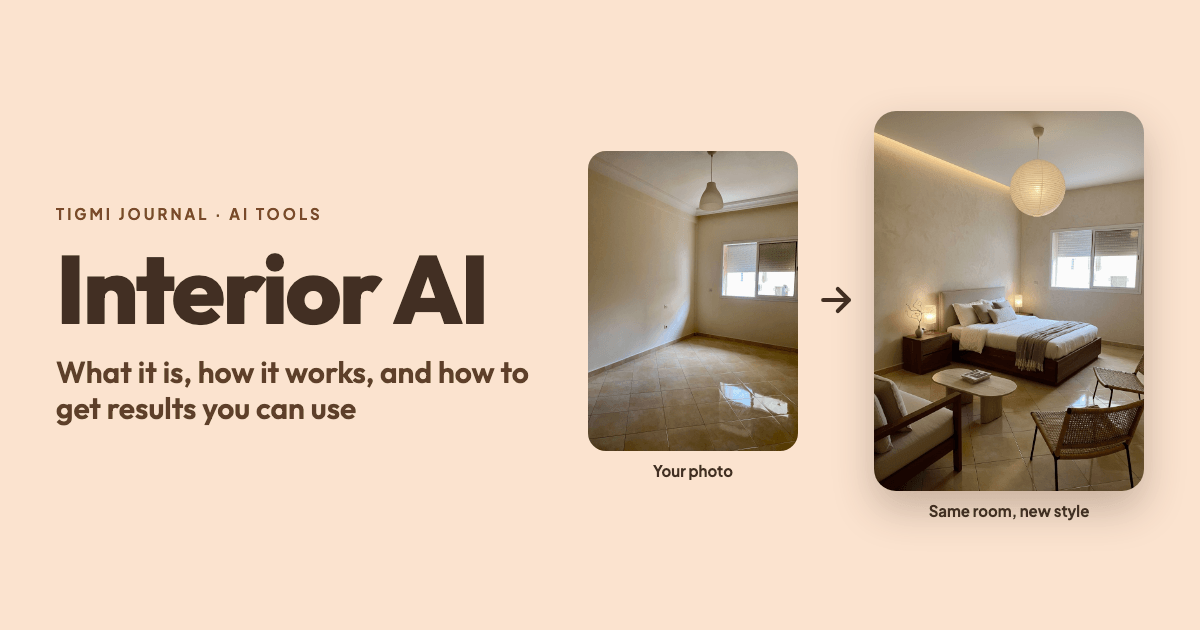
“Interior AI” means two things. It’s the general name for tools that redesign a room with artificial intelligence, and it’s also the name of one of those tools (InteriorAI, at interiorai.com). This guide is about the category: what these tools do, how they work, where they fall short, and how to get results you can use.
What interior AI does
You give it a photo of a room and an instruction; it gives you back an image of the same room, redesigned. Typical uses:
- Restyling: see your living room as japandi, Scandinavian, Mediterranean or industrial.
- Trying changes before spending: a new wall color, a different rug, warmer lighting.
- Virtual staging: furnishing an empty room so buyers or renters can picture it (see virtual staging for real estate).
- Editing a design: “make the sofa green”, “remove the coffee table”, “add plants”.
- Shopping the look: some tools search for real products that resemble the furniture in the design.
How it works, in plain terms
Interior AI tools are built on image-generation models, the same family of technology behind tools that turn text into pictures. The difference is the conditioning: instead of starting from nothing, the model starts from your photo and is guided to keep its structure (where the walls, windows, doors and floor are) while changing what you asked for.
In practice, three things decide the quality of the result:
- The photo. The model can only keep what it can see. A clear, well-lit photo taken from a corner gives it the room’s depth.
- The instruction. A named style plus a few concrete materials and colors beats a vague adjective. Our interior design prompt guide has examples.
- How well the tool protects the architecture. General image tools often “improve” the room by moving windows or raising the ceiling. Tools made for interiors put more effort into keeping the room as it is.
What it can’t do (yet)
Being clear about the limits is what makes these tools useful:
- No measurements. The image is not to scale. A sofa that fits in the picture may not fit the wall, so measure before buying.
- Furniture is generated, not real. The pieces in the image don’t exist as products. At best you can find similar ones.
- Details can be invented. Small objects, text, plugs and switches may appear or disappear. Check fine details before using an image in a listing.
- Not a construction plan. Moving a wall, plumbing or electrics still needs a professional.
How to get good results
Take the photo right. Daylight, lights off if possible, from a corner at chest height, with the floor and two walls visible. Tidy first: whatever is in the photo may stay in the design.
Start with a style, then adjust. Generate a first version with a preset style, then change one thing in your instructions for the next try (“lighter rug”, “oak instead of walnut”). Changing everything at once makes it hard to see what helped.
Say what to keep. “Keep the grey sofa and the parquet floor”, or “renting: no paint”. It avoids designs you can’t actually do.
Compare two directions. Generate two styles for the same room and decide side by side. It’s the fastest way to learn what you actually like.
Check before you buy. Measure, then look for similar products in your country and budget.
What to look for in an interior AI tool
| Feature | Why it matters |
|---|---|
| Keeps walls, windows and floor in place | Otherwise the image isn’t really your room |
| Edits on an existing design | Small changes without starting again |
| Empty-room staging | Essential for real estate and new homes |
| Product matching in your country | Turns a picture into a shopping list |
| Resolution, watermark and usage rights | What you can do with the images, especially for listings |
| Works in your language | Easier to describe what you want |
Free vs paid
Nearly every interior AI tool is free to try: a few images, usually watermarked. Paid plans add more designs, higher resolution, videos and commercial use (important for real estate agents and designers using the images with clients). For a single room, the free tier is often enough to settle on a style.
Try it on your room
Tigmi redesigns your own room from one photo in a minute or two, keeps its walls and windows, lets you add your own notes to a style, and finds similar products with Shop the look. The free plan includes 3 designs a month, and it works in six languages.
Tigmi Team
Product & EditorialThe people who build Tigmi, an AI tool that redesigns real rooms from a single photo. We write about what we learn testing styles, prompts and room photos every day.
Frequently Asked Questions
What is interior AI?
Interior AI is software that redesigns a room from a photo: you upload a picture, pick a style or describe what you want, and it generates an image of the same room with new furniture, colors and decor. Some tools also furnish empty rooms (virtual staging) or find products that look like the ones in the design.
Is interior AI free?
Most tools let you try for free with a limited number of images, often with a watermark. Higher resolution, more designs, videos and commercial use are usually in paid plans.
Can interior AI replace an interior designer?
Not for full projects. It is very good for exploring styles and deciding what you like, quickly and cheaply. It does not measure your room, plan electrics or manage suppliers, which is where a designer still adds a lot.
Is Interior AI the same as interiorai.com?
InteriorAI (interiorai.com) is one specific product. 'Interior AI' is also used for the whole category of AI interior design tools, which includes Tigmi and others.
Ready to see your room reimagined?
Upload a photo of your room and get a photorealistic redesign in a couple of minutes. Your first 3 redesigns each month are free.