What free AI interior design apps really include, the limits to expect, how to take a photo that works, and how to go from a picture to real furniture.
- ✓ Free AI decorating apps almost always limit the number of images, their resolution, or what you may use them for.
- ✓ Pick an app that keeps your actual room: same walls, windows and floor. Otherwise the result is inspiration, not a plan.
- ✓ The photo matters more than the app: daylight, from a corner, at chest height, no ultra-wide lens.
You take a photo of your living room, tap a style, and a minute or two later you see the same room redesigned. That’s the promise of every AI room decorating app. Some deliver; many give you a pretty picture of a room that isn’t yours. And “free” usually means “free to try”. Here’s what to expect, how to choose, and how to get a result you can actually use.
What “free” usually means
Every AI image costs the app money to produce, so free plans come with limits. Expect at least one of these:
- a small number of images, per day or per month;
- lower resolution, fine on a phone, not for printing or a listing;
- a watermark on the image;
- no commercial use, so not for clients or property listings;
- slower generation than on paid plans.
None of these is a problem if you want to explore an idea for your own home. They matter if you want to share the image with a contractor, print it, or use it for work.
What to look for in an app
It keeps your room. The most important test. A good result has the same walls, windows, doors, floor and ceiling as your photo, with new furniture and colors. If the app moves windows or invents a bigger room, you get inspiration, not something you can recreate.
You can steer it. Style presets are a good start, but you’ll want to add notes: “keep my sofa”, “sage green walls”, “no rug”. A free-text field makes a big difference.
It connects to real products. A picture is nice; knowing where to buy a similar coffee table, in your country, is what turns it into a plan.
Clear limits. Check how many images you get, at what resolution, and whether you may use them commercially before you spend time on it.
How to take a photo that works
The app can only work with what it sees:
- Daylight, with lamps off, ideally on a bright overcast day.
- Stand in a corner, so you capture two or three walls and the floor.
- Hold the phone at chest height, straight, not tilted up or down.
- Use the normal lens, not ultra-wide: distortion makes the AI misjudge the size of the room.
- Tidy up first. Clutter tends to come back as odd objects in the result.
From picture to a real room
An AI image is a direction, not a floor plan. Before buying anything:
- Measure. The AI doesn’t know your room is 3.8 m wide. Check that the sofa you like actually fits, with about 90 cm left to walk past.
- Change one thing at a time. If you like the walls but not the rug, note what works and adjust your instructions rather than starting from scratch.
- Keep what you have. Telling the app to keep your sofa or your dining table gives a far more realistic, and cheaper, result.
How Tigmi handles it
Tigmi works on the web and as an app for iPhone and Android. You take or upload a photo, choose the room type and one of 16 styles, from Japandi Calm to Mid-Century Modern, and add notes if you like. A redesign takes a couple of minutes. To furnish an empty room, use virtual staging instead.
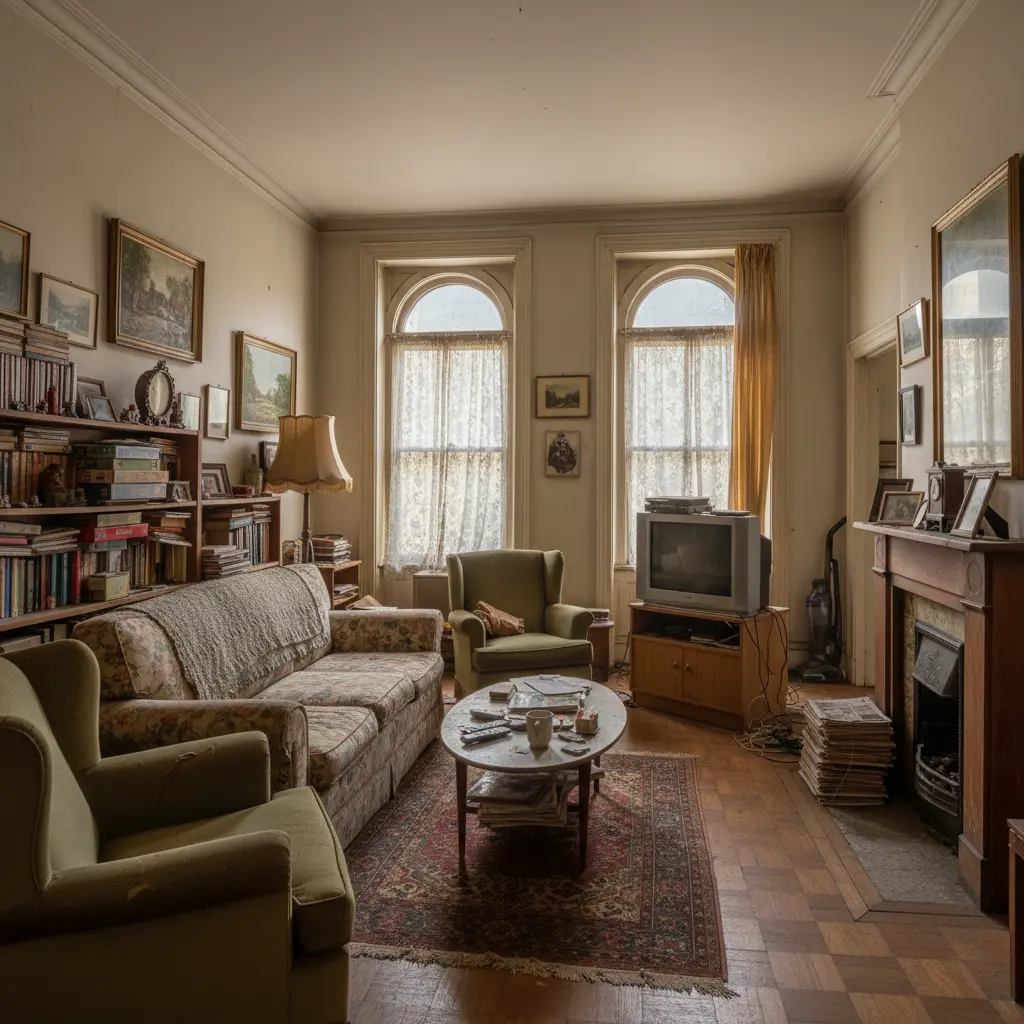
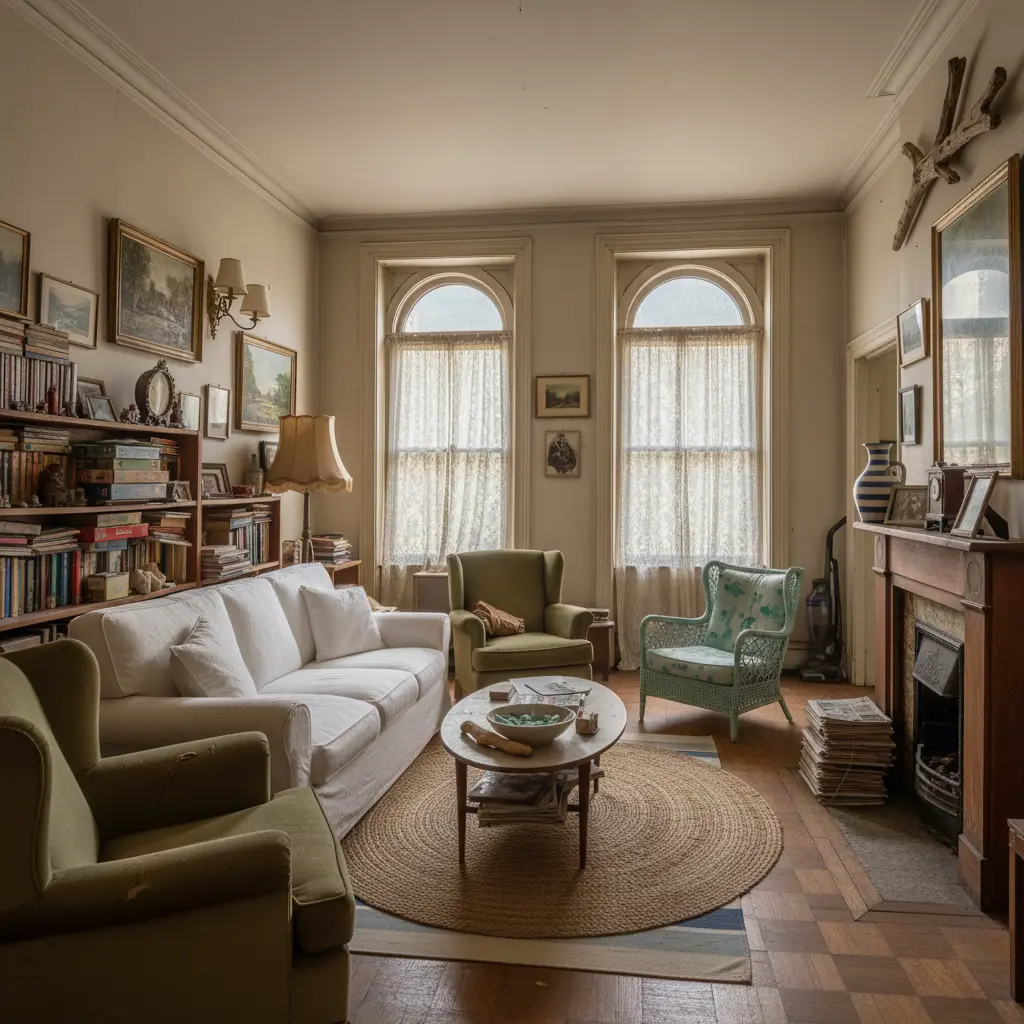
The walls, arched windows, fireplace and shelves stayed; the sofa, rug and TV corner changed. Notice the vacuum cleaner and the stack of magazines by the fireplace: they’re in both images, which is exactly why it pays to tidy up before you take the photo.
When you like a result, Shop the Look (on paid plans) identifies the pieces in the image and finds similar products in real stores in 45 countries, so you can see what the look would cost.
What’s free and what isn’t:
- Free: one redesign a month, with a small watermark.
- Basic, $14/month: 50 redesigns in 2K HD (at least 2048 px on the long side) without the watermark, plus Room Lock and Light Lock to ask the AI to keep your walls, windows, floor and light direction. Personal use.
- Pro, $25/month: 100 redesigns, commercial use.
- Business, $100/month: 500 redesigns.
Related: 3D home design online, free and without registration, how to write better prompts, and AI virtual staging.
Tigmi Team
Product & EditorialThe people who build Tigmi, an AI tool that redesigns real rooms from a single photo. We write about what we learn testing styles, prompts and room photos every day.
Frequently Asked Questions
Is there a completely free AI room design app?
Most apps give a few free images and then ask you to pay, often with a lower resolution or a watermark on the free ones. Tigmi's first redesign each month is free, with a small watermark.
Can I take a picture of my room and see it redesigned?
Yes, that's exactly how these apps work: you upload or take a photo, choose a style, and the app returns a new version of the same room. In Tigmi it takes a couple of minutes.
Is there a pay-per-use AI interior design app?
Some apps sell credits. Tigmi uses monthly plans instead: one free redesign a month, Basic at $14/month for 50, Pro at $25/month for 100 with commercial use, Business at $100/month for 500.
Ready to see your room reimagined?
Upload a photo of your room and get a photorealistic redesign in a couple of minutes. Your first redesign each month is free.